---
title: "Use subs, timeouts, and undo"
description: "Make substitutions, record timeouts, run the clock and periods, undo mistakes, and keep scoring when the connection drops."
canonical_url: "https://docs.hustlx.com/game-day/subs-timeouts-and-undo"
---
# Use subs, timeouts, and undo
> Make substitutions, record timeouts, run the clock and periods, undo mistakes, and keep scoring when the connection drops.
This page covers the controls you use between scoring plays: substitutions, timeouts, the clock and periods, and undo. It also explains what to do when your connection drops mid-game.
Operators with the match open on Game Day. On a shared basketball table, the clock and timeouts follow your focus. See [Share the table across devices](https://docs.hustlx.com/game-day/overview#share-the-table-across-devices).
## Before you start
- Start the match. See [Set lineups and start the match](https://docs.hustlx.com/game-day/lineups-and-starting).
- Keep the venue clock and the on-screen clock in step during stoppages.
## Make a substitution
### Open Substitution
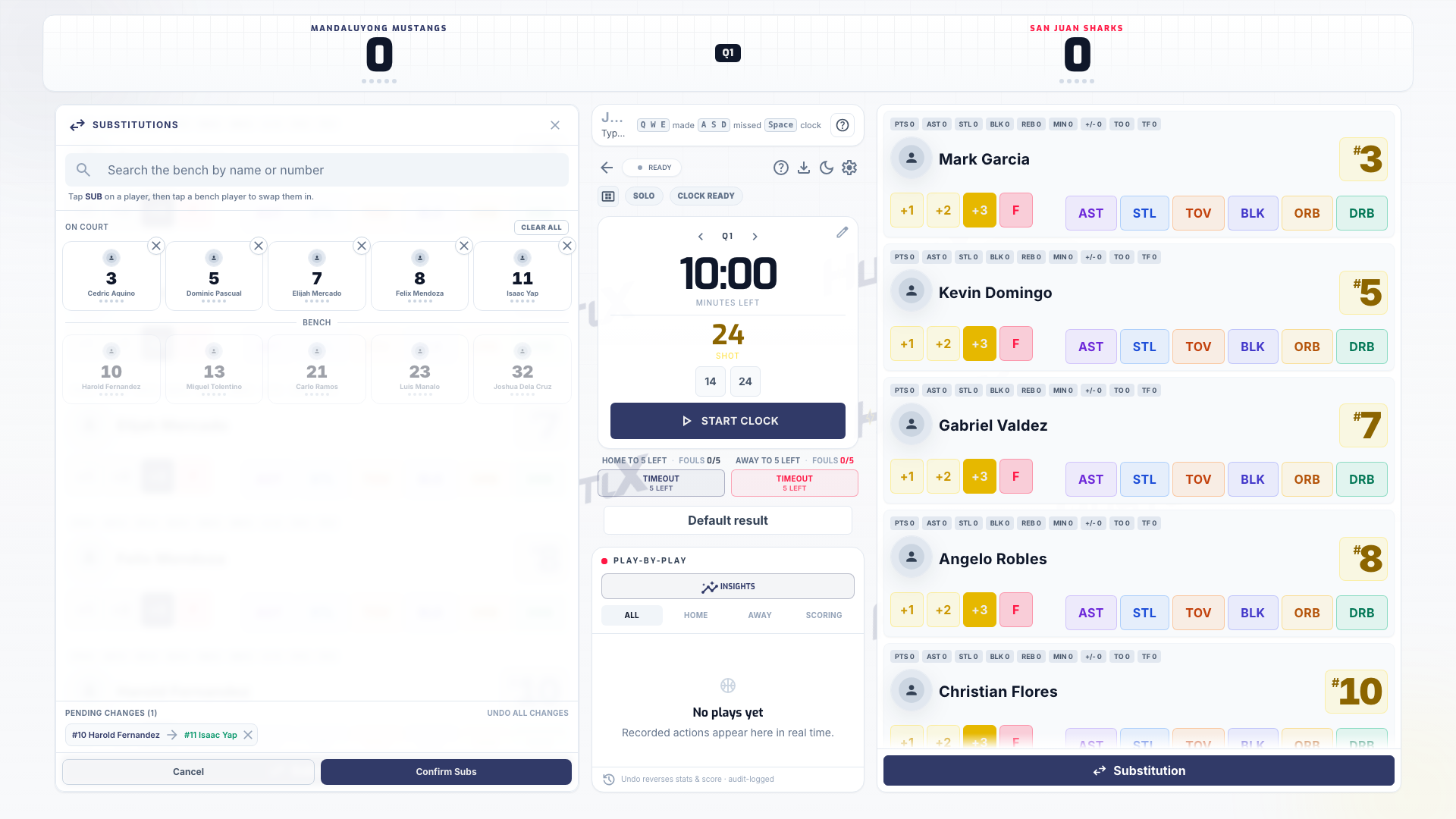
Select **Substitution** on the team's panel.
### Swap players
Select the outgoing player under **On Court**, then the incoming player under **Bench**. You can queue several swaps. Review them under **Pending changes**, or use **Undo all changes** to start over.
### Confirm the swap
Select **Confirm Subs**. In 3x3, substitutions are off while the clock runs: stop the clock for a dead-ball substitution before the check-ball.
Select **Substitutions** on the team's panel and swap the players. Substitutions are open by default. When your league turns on substitution rules and a swap goes against them, HustlX asks **Record this substitution anyway?**. Check with the officials, then select **Record anyway** to keep the game moving. The warning is logged with the substitution.
Use the substitution board for the team. Pick the player coming off and the player coming on. Before kickoff, change the starters with **Edit team sheets** instead.
## Record a timeout
- **Basketball**: each team's timeout buttons sit under the clock with the count left (for example **Home TO 2 left**). When a team has used its allowance, the button stays tappable: HustlX asks **No timeouts left** and you can select **Record anyway**.
- **Volleyball**: select **Timeout** on the team's panel. Timeouts reset when you complete a set.
- **Futsal**: record each team's timeout from the team actions.
## Run the clock and periods (basketball)
- **Start and stop**: use play and pause to match the venue clock.
- **Shot clock**: use the reset buttons for a full or short reset (24 and 14 in a usual 5v5 setup).
- **Correct the clock**: select the clock to open **Edit Clock**. Adjust **Game Time (MM:SS)**, **Shot Clock**, or **Quarter**, add a **Shot Clock Note** if needed, and save.
- **Change period**: use **Next period** or **Previous period**. HustlX asks **Change period?**, or **Reset team fouls?** when the move resets team fouls. Select **Confirm** or **Reset & advance**.
- **Overtime**: when regulation ends tied, the match button changes to **Start Overtime**.
For football and futsal, select **Edit match clock** to correct **Clock (MM:SS)** or **Stoppage (MM:SS)**.
## Undo an action
Select the undo button on the play in the play-by-play, or press Backspace with nothing typed to undo the latest play. Undo happens right away and shows **Play undone.** It reverses the score and stats, and every undo is logged. Undoing a timeout gives the timeout back.
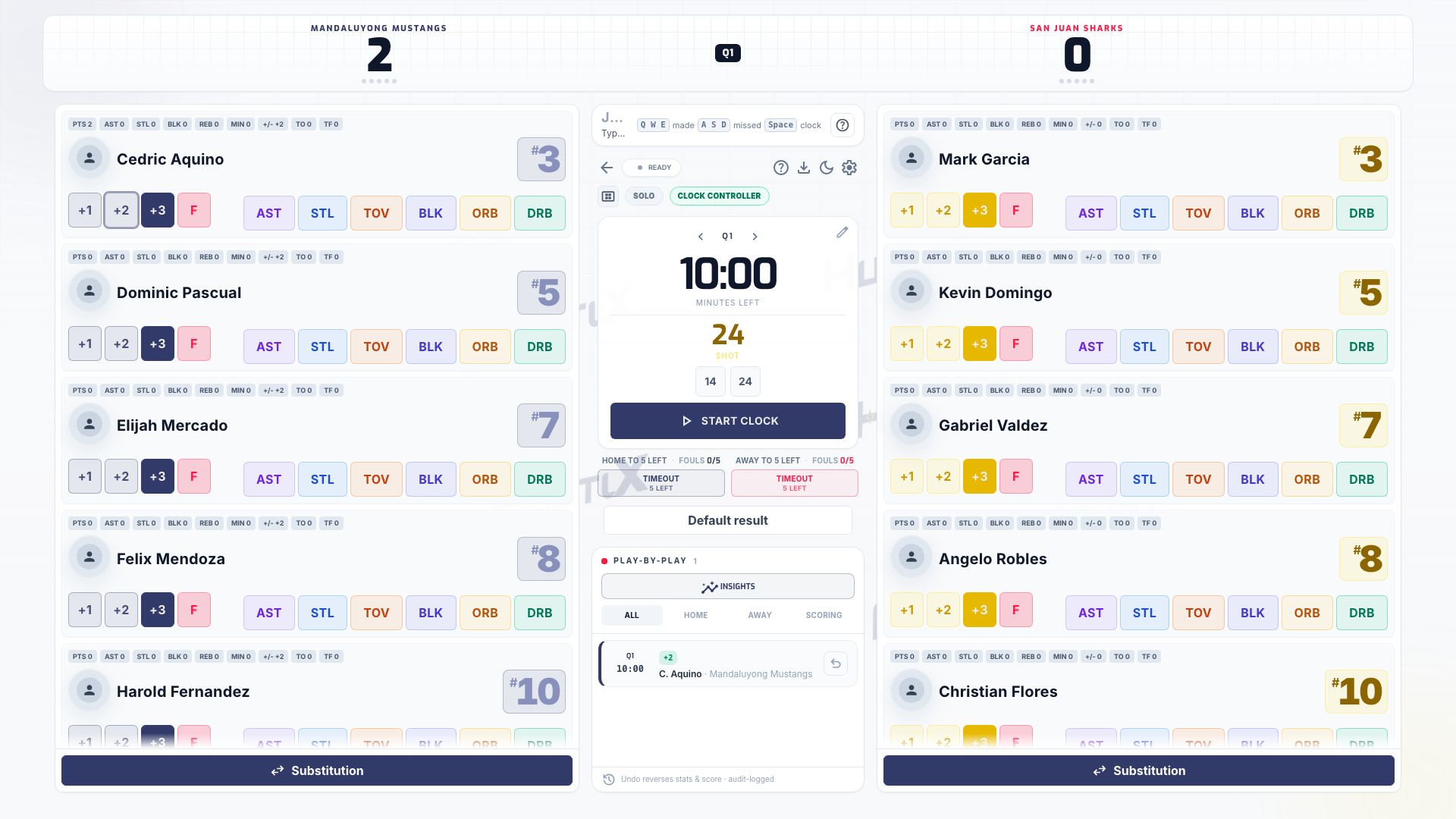
Select **Undo last**, or the undo button on any row of the play-by-play. Undo happens right away, reverses the score and stats, and is logged.
Select **Undo last** or **Undo** on an event in the timeline. In **Undo latest event**, enter an **Undo Reason**, then select **Undo event**.
After undoing, record the correct action and check the score.
Do not end a match to reset a wrong score. Undo the wrong action, or fix stats on the match page after the match. See [End a match and review awards](https://docs.hustlx.com/game-day/ending-a-match#fix-stats-after-the-match).
## When the connection drops
Keep scoring. Actions you record while offline are saved on the device and sync when you reconnect. The status in the console header shows **Ready**, **Updating**, **Live**, or **Retry**.
- If a saved action is refused when it syncs, a **Sync paused:** banner appears. Select **Resume** to try again, or **Discard blocked action** to drop that one action.
- If the clocks disagree after you reconnect, HustlX shows both times. Choose **Use backend time** (the saved match clock) or **Use frontend time** (this device's clock).
- Starting and ending a match need a live connection. If you are offline, HustlX shows **Reconnect to finish the match.**
- Use one tab per device. A second tab of the same match can watch, but it cannot start or end the match.
## Troubleshooting
### Another device took the clock
The clock follows the last operator with the **Clock** or **Lead Table** focus who tapped a clock control. Tap a clock control on your device to take it back, and agree at the table who runs it.
### The substitution button is disabled in 3x3
Stop the clock. 3x3 substitutions happen only in a dead ball.
### I undid the wrong play
Record the play again. Undo does not have a redo.
## Related guides
- [Record scores and stats](https://docs.hustlx.com/game-day/scoring-and-stats)
- [End a match and review awards](https://docs.hustlx.com/game-day/ending-a-match)
- [Run a match on Game Day](https://docs.hustlx.com/game-day/overview)
## Sitemap
See the full [sitemap](https://docs.hustlx.com/sitemap.md) for all pages.