Score a match as the table scorekeeper
As the scorekeeper, you run the Game Day console at the table while the referees run the game. Your record becomes the box score, standings, leaderboards, and player profiles, so accuracy matters more than speed. This page covers access and good table habits. The step-by-step controls live in the phase guides linked below.
Get access
Ask for the right role
Ask the organization owner or an admin to add you as a member with the League Manager role (or Organization Admin). They set roles in the organization's member settings.
Sign in on the scoring device
Use your own HustlX account on the tablet or laptop you will score on. Each operator signs in on their own device.
Open the match and start Game Day
Open the league, go to Matches, select the fixture, and select Start Game Day. See Run a match on Game Day.
Pick your focus at a shared table
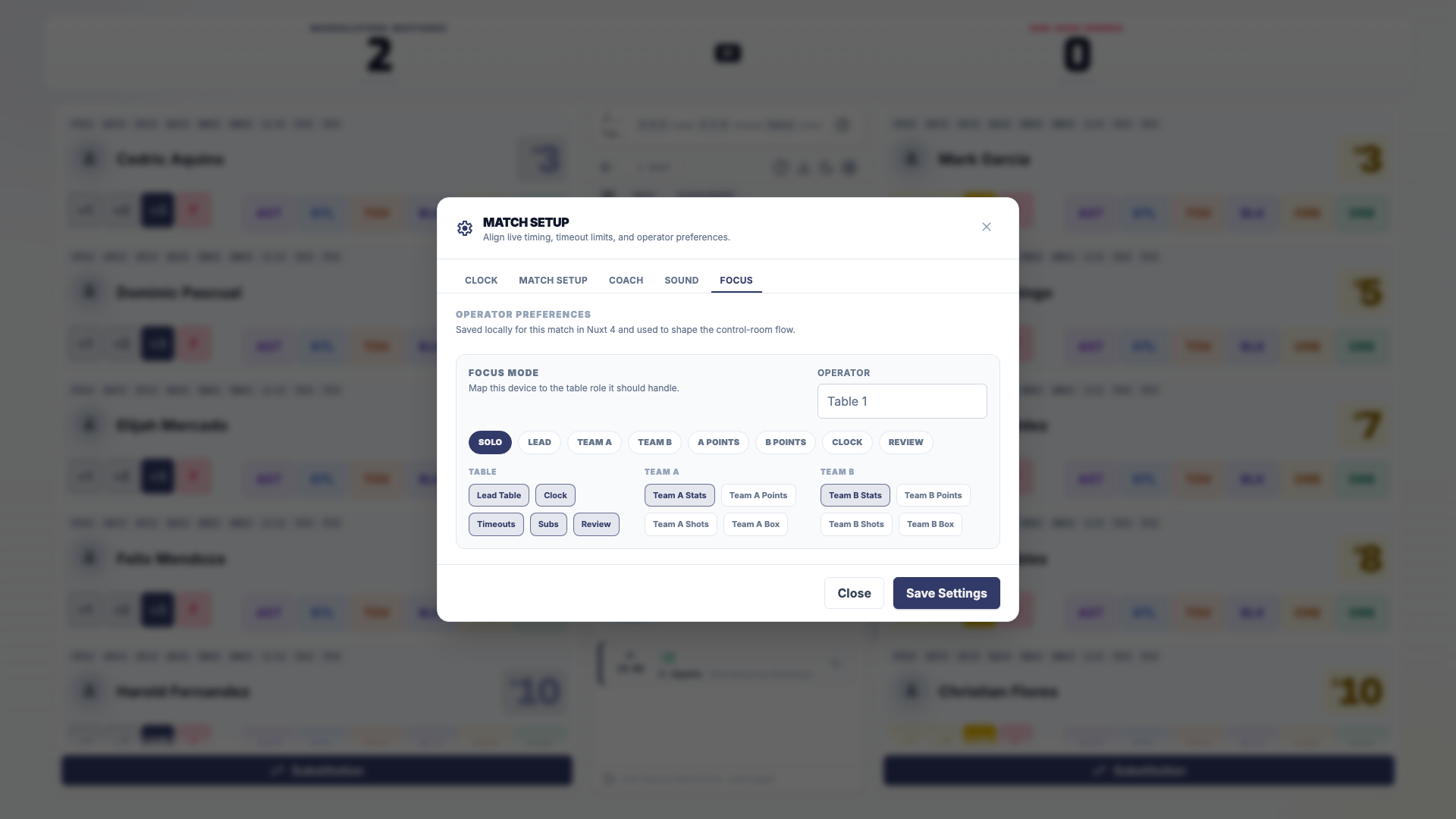
If more than one person is scoring a basketball match, open settings (the gear icon), choose Focus, and pick your job: Lead Table, Clock, Team A Stats, Team B Stats, and so on. Scoring alone? Keep Solo.
What the scorekeeper controls
| Phase | You can | Guide |
|---|---|---|
| Before play | Confirm both starting lineups, review match setup, start the match | Set lineups and start the match |
| Live play | Record shots, rallies, goals, stats, and fouls | Record scores and stats |
| Stoppages | Make substitutions, record timeouts, run the clock and periods | Use subs, timeouts, and undo |
| Corrections | Undo any recorded play from the play-by-play | Undo an action |
| Final | Confirm the winner, pick the player of the game, print the box score | End a match and review awards |
What you cannot do from the console:
- Change league rules. The console shows a League Rules summary; rule changes happen in the league's settings.
- Score a match in a draft league, or a match that is already concluded or cancelled.
- Start or end the match from a second tab of the same match on one device.
- Hand out season awards. Those live on the league awards page.
HustlX never stops you from scoring because of a player's claim status or a roster count. Claimed, unclaimed, guest, and imported players are all scored the same way. When a timeout, substitution, or libero action goes past a league rule, HustlX asks you to confirm instead of blocking it. Follow the officials' call.
Before tip-off or first serve
- Check both rosters and jersey numbers with each team.
- Agree who runs the clock, who records stats, and how you will signal a correction.
- Confirm the format: quarters or one 3x3 period, shot clock values, or best-of sets.
- Find the undo buttons in the play-by-play and the Open tutorial help icon before play starts.
Live scoring habits
- Score what happened, on who did it. If you are not sure who took the shot, check the jersey number with the referee before recording.
- One action at a time. Glance at the score and the newest play-by-play entry after each action.
- Do not guess stats. If you did not see the assist, do not record one.
- Fix mistakes at once. Undo the wrong play right away, then record the right one. Undo reverses the score and stats and is logged.
- Follow the officials. Fouls, cards, timeouts, and set outcomes are the referee's call. Record their decision.
- Keep the clocks matched. In a stoppage, check the on-screen clock against the venue clock and correct it with Edit Clock.
- Stay calm offline. Keep scoring if the connection drops. Actions sync when you reconnect. You need a connection only to start and end the match.
After the final whistle
- Compare the final score with the referee's scoresheet.
- End the match and confirm the winner and awards. See End a match and review awards.
- Open the match page and check the box score. Use Edit stats for any stat line you need to fix.
- Print the box score if your league needs a paper record.
Final stats then appear on player profiles and league leaderboards.
Troubleshooting
I am on the crew slate but cannot start Game Day
The Scorer crew role does not include console access. Ask an owner or admin for the League Manager role, or have someone with that role open the console on the scoring device.
Two of us are tapping the clock
The clock follows the last tap from a device with the Clock or Lead Table focus. Give the clock to one person and set everyone else to a stats focus.
Related guides
End a match
Finish a match on Game Day, confirm the winner, pick the player of the game, record a default result, and check the saved box score.
Tutorials and tours
Find guided tours in Help & Tours, practice basketball game day in the Practice Arena, and replay the Game Day scoring tutorial in the console.