Learn with tutorials and tours
HustlX has guided tours that highlight controls on the page you are using, plus a Practice Arena where you can run a basketball game day with sample data. Use them to train new scorekeepers before a live match.
Before you start
- Sign in and select your organization, so tour links can open your organization's pages.
- For the Game Day scoring tutorial, have a match you can open on Game Day. See Run a match on Game Day.
Find a tour in Help & Tours
Open Help & Tours
Open your account menu and select Help & Tours. In an organization's Manage area, you can also open More actions in the header and select All guides.
Pick a category
Select All tours or a category such as Getting Started, League Ops, or Game Day & Media.
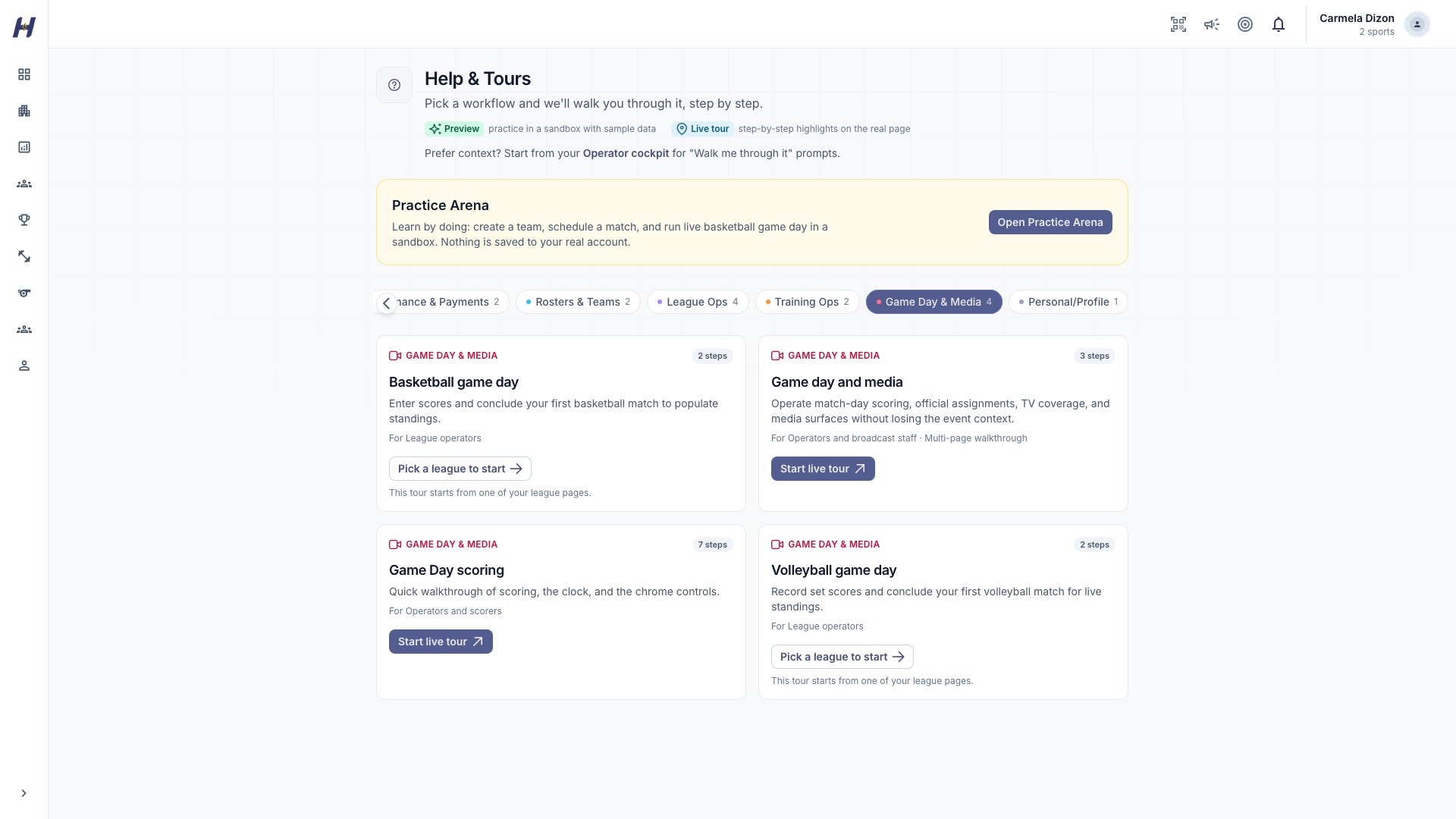
Start the tour from its card
Each card shows one action:
- Start preview: practice in a sandbox with sample data.
- Start live tour or Live tour: open the real page and start highlighting.
- Pick a league to start: choose one of your leagues; the tour starts from that league's page.
- Select an organization to start: select your organization in the app first.
- Launch from:: open the named page and start the tour there.
Tours for match day
| Tour | What it covers | Where it runs |
|---|---|---|
| Game Day scoring | Scoring, period controls, CSV download, compact mode, theme, and exit | Inside the basketball console |
| Basketball game day | Finding fixtures and entering or concluding results | Your league's Manage Matches page |
| Volleyball game day | Entering set scores and concluding matches | Your volleyball league's Manage Matches page |
| Game day and media | The console, officials assignments, and HustlX TV | Several pages in sequence |
| Set up matches | Generating and reviewing fixtures | Your league's matchmaking page |
Start Game Day scoring and Game day and media from inside a running console. Opened from the catalog without a match, the console has no game to load.
Practice in the Practice Arena
On Help & Tours, select Open Practice Arena. You create a team, schedule a match, and run a live basketball game day in a sandbox. Nothing is saved to your real account, so it is a safe place for a new scorekeeper to learn the controls.
Replay the Game Day scoring tutorial
Open the console
Open the match and select Start Game Day. Confirm the starting lineups so the console is visible. Run the tutorial before tip-off or in a long break, not during live play.
Select Open tutorial
Select the help icon above the clock, labeled Open tutorial. The tour walks through Welcome to Game Day, Scoring, Change quarter, Download CSV, Compact scoring, Theme, and Exit.
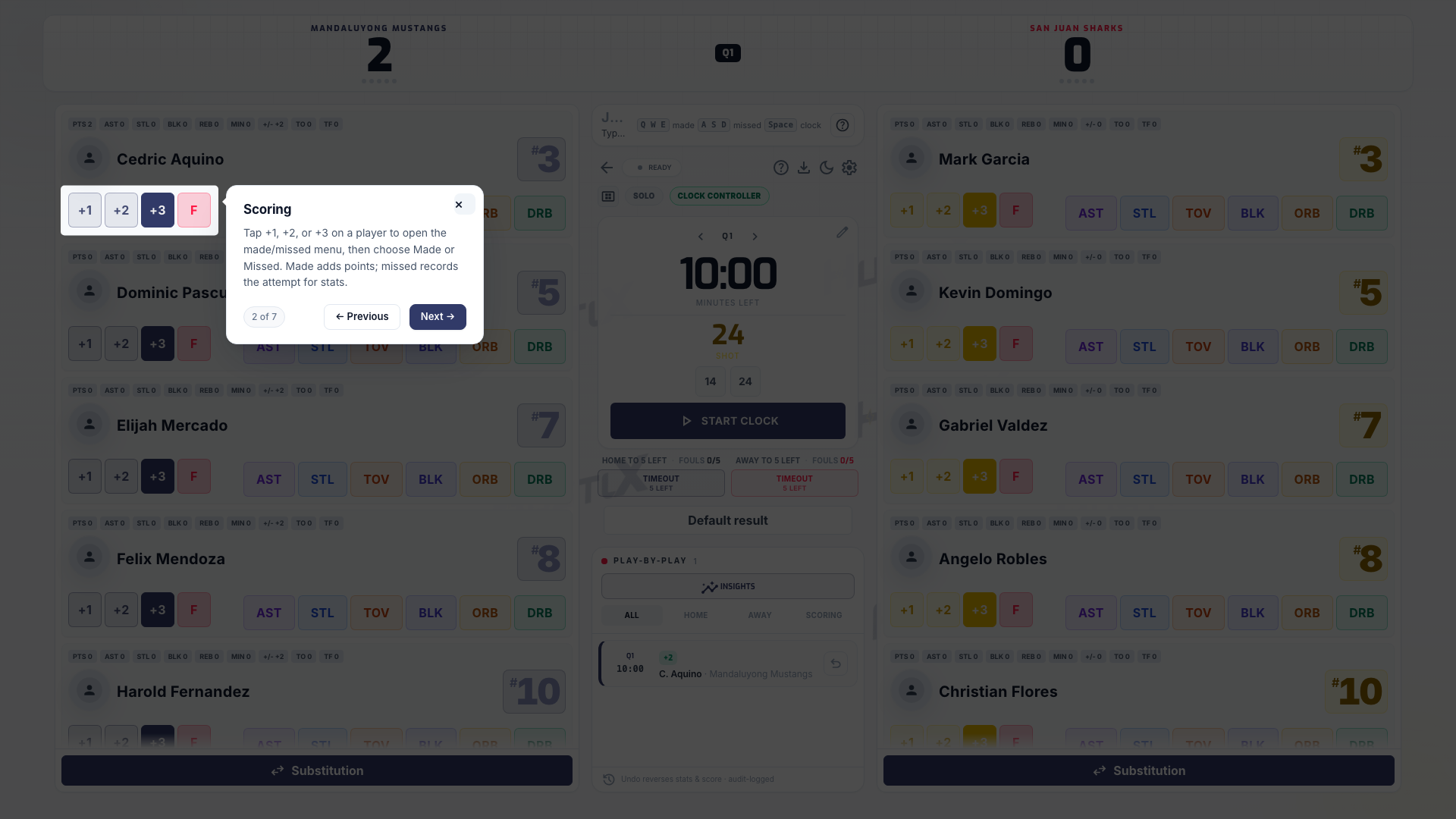
Close or replay it
Close the tour whenever you are ready. Select the same help icon to replay it.
The tutorial covers the basketball console. For volleyball, use the Volleyball game day tour and the volleyball steps in these guides.
Replay a page tour
On a page with a tour, open More actions in the Manage header and select Tour this page. Use the tour's next and back controls, and close it when you are done.
On your league's Matchmaking page, the first visit offers Start tour or No thanks. Choosing No thanks does not remove the tour: select Show me how at any time to replay it.
Troubleshooting
HustlX says Walkthrough unavailable
The tour could not find its controls on this page. Check that you opened the right page and that your role and the league state show those controls. You can still follow the written guide.
The card says Select an organization to start
Select your organization in the app, then return to Help & Tours.
Related guides
Scorekeeper guide
Get access to Game Day, know what the scorekeeper controls, and keep a clean live record from tip-off to the final whistle.
Game Day v2 keyboard
Watch one basketball game scored on Game Day v2 from the keyboard, from Start Game Day to the live match page and the MVP race, in under three minutes.