Run a badminton league
Badminton leagues run in the same league workspace as other sports. This page covers what is different: entrants and team duals, scoring presets, the badminton crew, and how results finish automatically. Use the general league guides for everything else.
Before you start
- Read Create a league and Create and schedule matches. Badminton leagues use Customized setup.
- Prepare your entrant list. See Roster imports and claims.
Set up a badminton league
Choose the match format
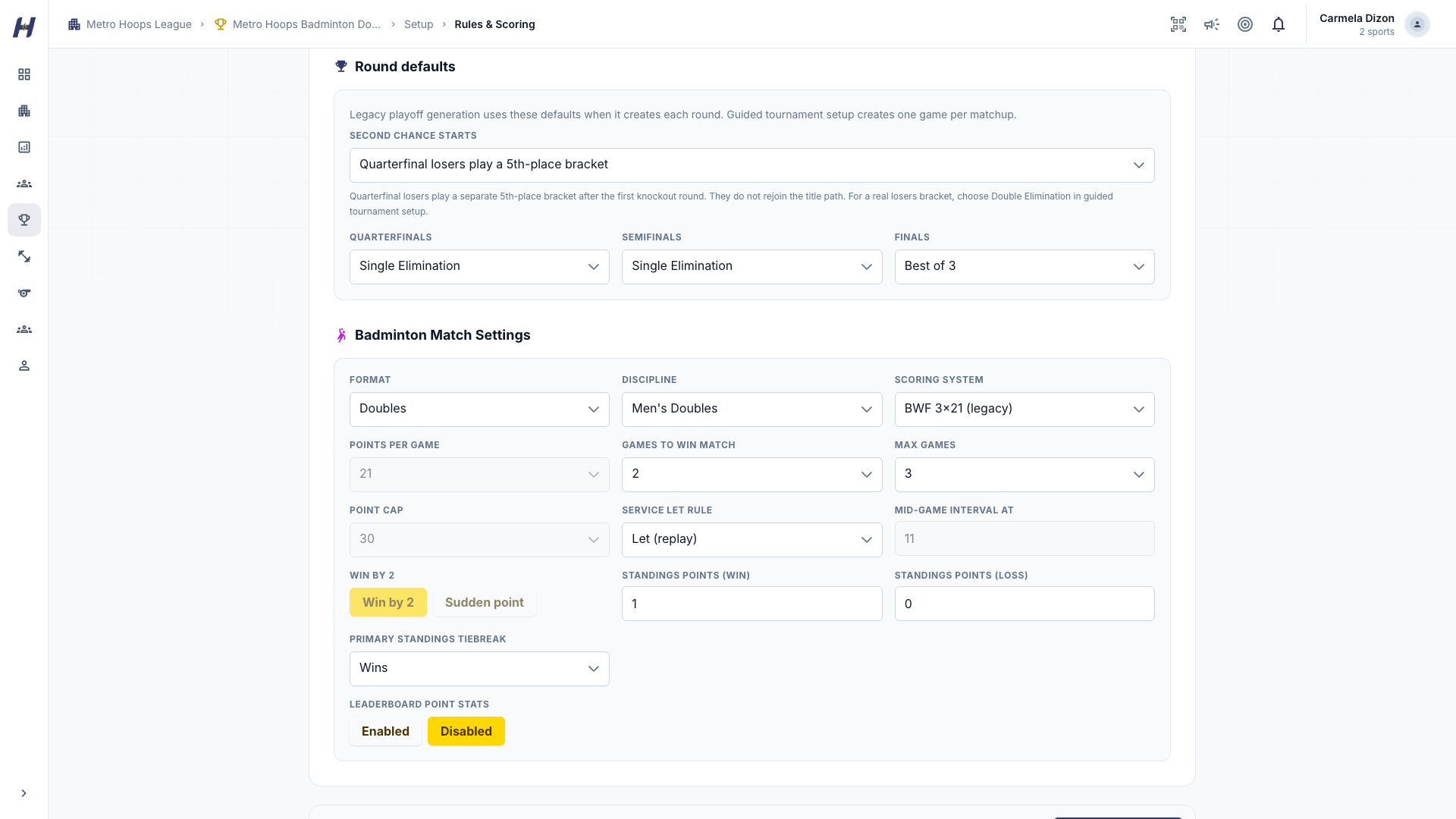
In Rules & Scoring, pick a Format: Singles, Doubles, Mixed Doubles, or Team Dual, and a Discipline such as Men's Singles or Mixed Doubles. Badminton leagues use these formats instead of a team competition format.
Choose the scoring preset
Pick a Scoring System:
- BWF 3x21 (legacy): rally scoring, best of three games to 21, a two-point margin, and a 30-point cap.
- BWF 3x15 (2027): best of three games to 15 with a 21-point cap.
- Custom / house: supported short or house formats.
Review standings points, tiebreak order, and the leaderboard settings before publishing. A saved league keeps the rules you chose; picking a different preset for another league does not change it.
Add entrants
Open Manage (the league's Settings tab opens it), then Setup > Entrants, and add individual players for singles, pairs for doubles or mixed doubles, or teams for a team dual. Players can take part before they link their roster record to an account.
Set up team duals
For Team Dual, configure the singles and doubles lines before creating matches. The parent tie summarizes the line results; line players do not become extra teams in the standings.
Schedule and brackets
The competition builder supports round robin, knockout brackets, and pools feeding knockout stages. Review entrants, seeding, byes, dates, and courts in the preview before publishing.
Finish pool matches before qualifying entrants. If an exact unresolved tie affects qualification, use the tie-resolution panel to record the order your organizers agreed. A result correction can change an unplayed downstream matchup; started matches need an explicit review.
Crew
In the match's officials assignment area, configure crew slots for an umpire, service judge, scorer, line judge, court manager, and tournament director. Assign the crew your event needs. Role eligibility and assignment permissions still apply. HustlX records scores and decisions; officials remain responsible for their judgments.
Record and finish results
Open the match's Game Day controller. Record rally winners, or enter completed game scores when detailed capture is not available. You can also record a walkover, retirement, or disqualification with a reason.
Select the serving player when known. Keep operating when optional details are missing, and confirm the actual player before recording attributed statistics. Only the latest recorded action can be undone.
When a side wins the match, HustlX saves the final result automatically and takes you to the game results. There is no extra scorecard review or confirmation step. Eligible final results count toward standings, rankings, leaderboards, and award suggestions.
If an older finished match is still pending, an authorized operator can open Game Day to finish it automatically. Disputed and excluded results stay out of standings until their correction or eligibility is resolved.
Standings, statistics, and awards
- Standings group columns into Matches (won and lost), Games (games won and lost inside those matches, plus game win percentage), and Rally points (for, against, and difference). An unbeaten entrant can still show games lost, because a 2-1 win counts one lost game. The ranking order under the table lists your saved tiebreak rules in the order they apply. These are local league rankings, not BWF world rankings.
- Leaderboards include match wins, win percentage, game percentage, points won, and point differential. When operators capture player details, boards can also show rally wins, aces, service faults, and errors. HustlX never invents player statistics from a final score.
- A player who later links their roster record keeps their match history and appears as one athlete.
- Assign season awards as in Standings, playoffs, and awards. Performance suggestions depend on confirmed results and enough capture; MVP selections stay your decision.
Troubleshooting
A result does not appear in the standings
Check that the match finished successfully and is eligible to count. Open Game Day for an older pending result to complete its closeout. Disputed and excluded results do not count.
Player stat boards are empty
The matches were scored by game totals only. Detailed boards fill in when operators capture rally-level details.
Qualification is stuck on a tie
Record the agreed order in the tie-resolution panel, then continue.
Related guides
Pickleball
Learn what changes for pickleball leagues, from singles and doubles entrants and side-out scoring to reading standings, leaderboards, and the live scoreline.
Racquet leagues
Run Tennis, Table Tennis, Badminton, Pickleball and Padel leagues with native scoring, confirmed standings, statistics and organizer-reviewed awards.