Use the sponsor portal
HustlX runs sponsor and ad placements for brands that support the leagues on HustlX. Invited sponsor users get a read-only sponsor portal to review how their campaigns performed.
How placements work
HustlX manages all sponsor and ad placements. Organizations do not create, edit, or sell placements in HustlX. HustlX staff set up sponsor accounts, campaigns, creative, placements, conversion goals, and portal access.
Clearly labeled placements can appear on public league pages and match pages. They never appear inside scorekeeping, payment, or other interactive controls. Sponsor campaigns and reports do not alter training pricing, checkout, or payment settlement.
If a placement looks wrong or links somewhere unexpected, contact Support with the page link. Brands can use the same route to ask about sponsorship.
Open your reports
Accept your invitation
Open the full invitation link HustlX sent you and sign in to the invited account. Verify your email if asked, then select Accept sponsor invitation. HustlX opens your reporting portal.
Keep the link private. It works once, and it is rejected if it has expired, was revoked, was already accepted, or belongs to a different email address. Ask your HustlX commercial contact for a new one if it stops working.
Choose an account
The Sponsor analytics page lists your Assigned accounts. If you have more than one, use the account switcher in the portal header to change accounts.
Open a campaign
On Campaigns, select a campaign to open its report. Times use the account's reporting timezone, shown on the page.
Filter the report
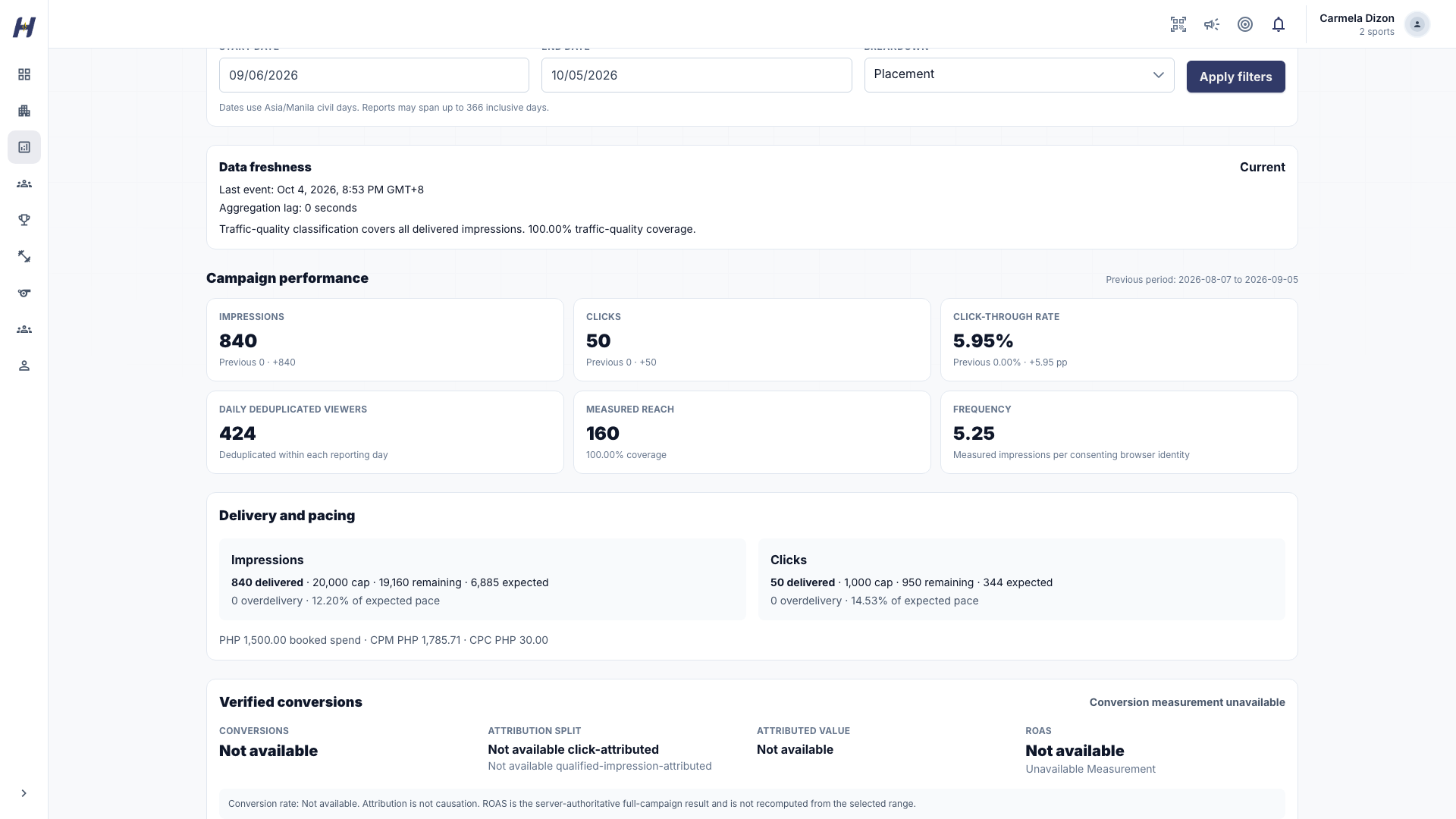
Set a Start date and End date, pick a Breakdown (such as day, creative, placement, surface, device category, or conversion goal), and select Apply filters.
Understand the numbers
- Impressions, Clicks, and Click-through rate: accepted delivery for the period.
- Daily deduplicated viewers: consenting browser identities, counted once per reporting day.
- Measured reach: distinct consenting browser identities across the selected period, with the share of delivery that could be measured shown as coverage.
- Frequency: measured impressions divided by the distinct consenting browser identities in the period.
Daily deduplicated viewers are not period reach. Adding daily counts can count the same browser on several days. Reach counts browser identities, not exact people. One person using multiple devices can count more than once; people sharing a browser can count once. Low consent coverage can make reach and frequency partial or unavailable.
Conversion attribution
A conversion is a server-verified HustlX outcome, such as a registration, inquiry, or settled payment. HustlX credits it to the last eligible click inside the goal's attribution window, or to a qualified impression when there was no click. The report shows Conversions, the Attribution split, Attributed value, and ROAS when the data supports them.
Attribution does not prove causation. The report cannot see outcomes that happen off HustlX, and campaign reports never promise reach, sales, conversions, or return on ad spend. When value, spend, consent, or attribution inputs are incomplete, the report marks them partial or Not available. Treat that as a measurement limit, not zero value.
Exports and scheduled reports
Select Reports in the portal header to open Report delivery.
Create a private CSV export
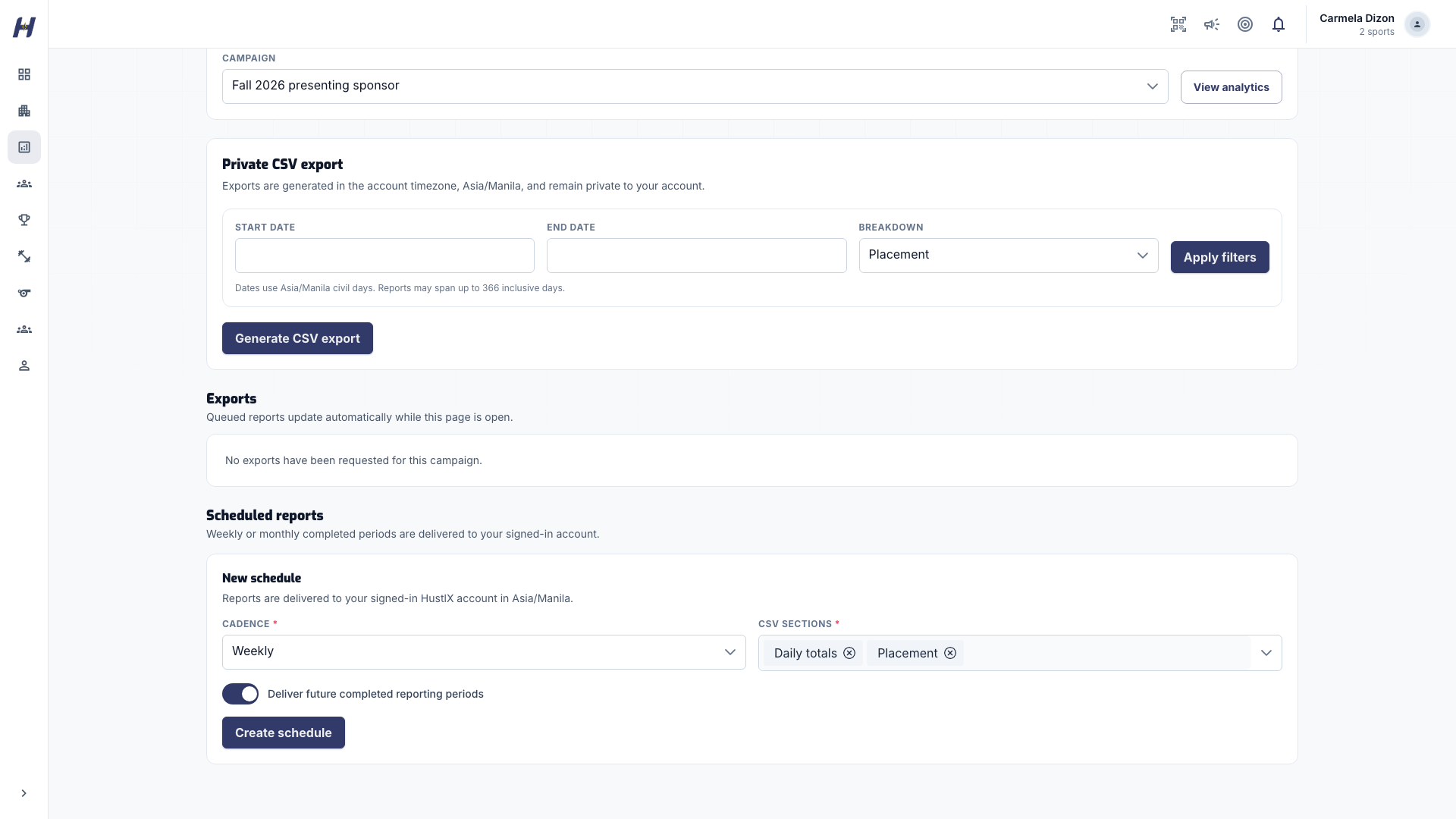
Choose a Campaign, set the filters, and select Generate CSV export. When the export is ready, select Download CSV. Exports use the account timezone and stay private to your account.
Schedule a report
Under Scheduled reports, choose a Cadence (Weekly or Monthly) and the CSV sections, then select Create schedule. Completed periods are delivered to your signed-in HustlX account.
Pause or remove a schedule
Turn off Deliver future completed reporting periods to pause a schedule, or select Delete schedule to remove it.
Exports and scheduled reports contain aggregate measurement only, never raw user, payer, or contact identifiers. Download links are short-lived. Delivery stops when the schedule, campaign, or your account access is revoked.
Privacy and consent
Placements are contextual, not behaviorally targeted. HustlX records the aggregate delivery needed to run a placement even without a measurement identity. Deduplication, reach, frequency, and attribution depend on viewer consent and retained privacy-preserving data.
People can decline or withdraw consent as described in the Privacy Policy. Sponsor users cannot use reports or exports to identify, contact, profile, or re-identify viewers or payers.
Troubleshooting
A campaign or report is missing
Check the selected account in the header and your date filters. Then email support@hustlx.com with the account name, campaign name, date range, and what you expected. Never send invitation links, export links, or personal data.
Reports say they are no longer available
Your access to that account was revoked. Ask your HustlX commercial contact to review your membership.
I am leaving my company
Ask your HustlX commercial contact to revoke your sponsor account membership. Do not share your account or export links.