Record scores and stats
Every action you record updates the score, the player's stats, and the play-by-play at the same time. Record what happened on the court, on the player who did it, as soon as play allows.
Before you start
- Set lineups and start the match. See Set lineups and start the match.
- Agree with the table who records shots, who records other stats, and who runs the clock.
Record play
Record a shot
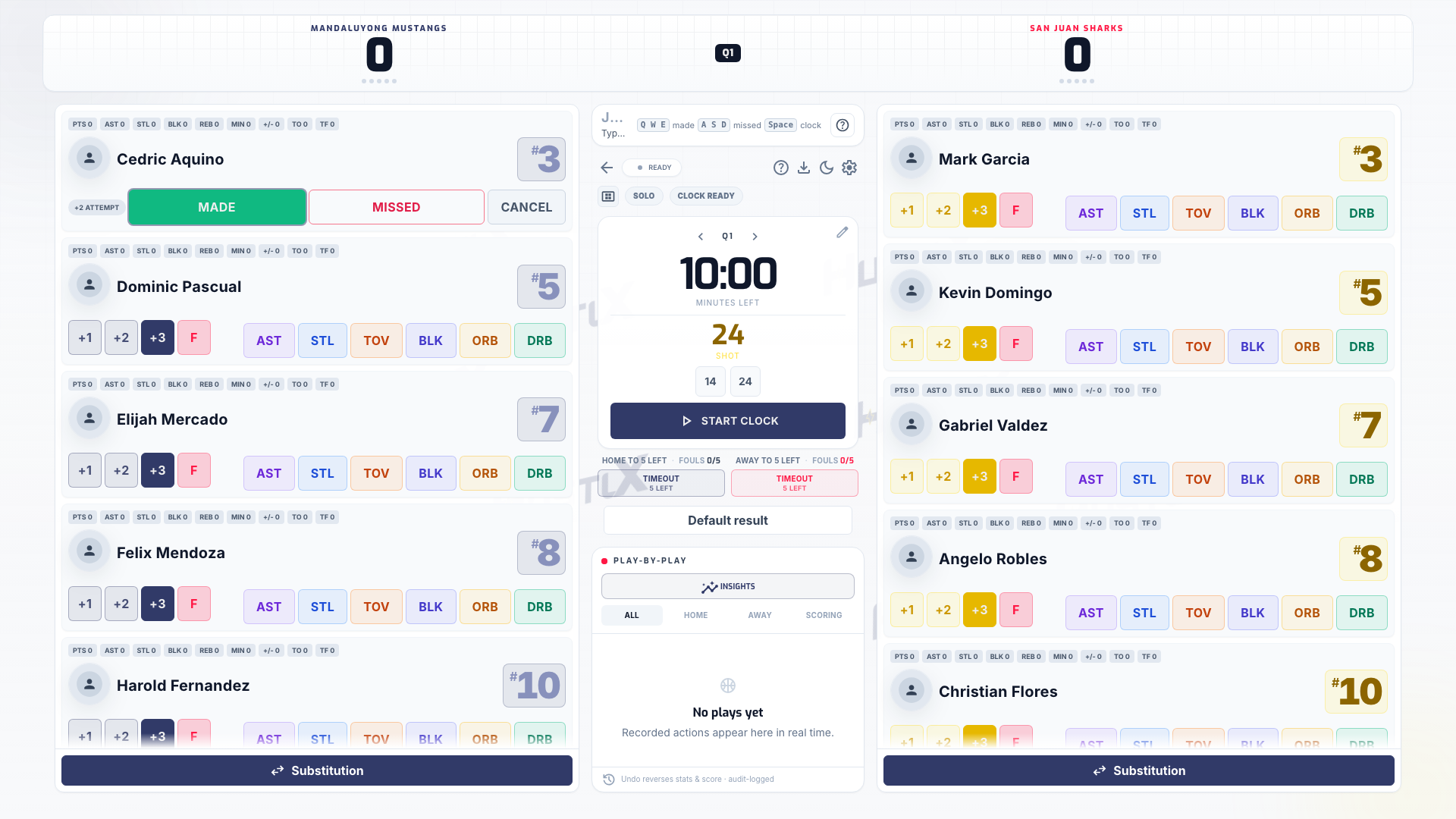
On the shooter's row, select the shot value (+1, +2, or +3), then choose Made or Missed. Made adds the points. Missed records the attempt for shooting stats. After a made field goal, the shot clock display resets to full automatically.
Record other stats
Use AST, STL, BLK, ORB, DRB, and TOV on the player who earned them. An offensive rebound resets the shot clock to its short value.
Record a foul
Select the player's foul button and choose the foul type, following the referee's call: PF (personal), TF (technical), FF (flagrant), UF (unsportsmanlike), DQ (disqualifying), or W (warning). When a team reaches the foul penalty, the panel shows the free-throw guidance for the next foul. When a player fouls out or is disqualified, the clock pauses and the substitution dialog opens so you can bring in a replacement.
Check the play-by-play
Each action appears at the top of the play-by-play. Check the score and the entry before the next play.
Record the rally
Select the player involved, then the action: Point, Kill, Ace, Block, Dig, or Assist. For an error, use Service Err or Attack Err and check which team received the point.
Record team faults
Use Rotation error or More faults on the team panel for a fault that is not tied to one player. Use the sanction cards when the referee shows one.
Check the server and score
The court diagram and the current server update after each rally. Check the set score before the next serve.
If a libero action goes against a rule your league turned on, HustlX asks Record this libero action anyway?. Check with the officials, then select Record anyway to keep play moving. The action is logged with the warning.
Record an event
Use the team actions and pitch board to record goals, own goals, assists, shots, shots on target, blocked shots, saves, fouls, corners, offsides, and penalties. Pick the player when the event belongs to one.
Record cards
Record a Yellow Card, Second Yellow Red, or Red Card on the player the referee booked.
Track possession and timeouts
Set possession from the team actions when your crew tracks it. In futsal, record each team's timeout and watch the accumulated foul count.
Basketball 5v5 vs 3x3
The same basketball console adapts to the league's format.
| 5v5 | 3x3 | |
|---|---|---|
| Shot buttons | +1, +2, +3 | +1, +2 (and FT) |
| Periods | Four quarters, shown as Q1 to Q4 | One period with no quarter or period badge; overtime shows OT |
| Shot clock | 24 seconds, short reset 14 | 12-second shot clock |
| Winning | Highest score at the end | First-to-21 in regulation; in overtime, the first team to score 2 points wins |
| Team foul penalty | From the 5th team foul | 7th team foul: 2 FT; 10th team foul and later: 2 FT + possession |
These are the usual defaults. Your league can set different values, so follow the configured rules. In 3x3, substitutions need a dead ball: stop the clock before the check-ball. Clear-the-ball decisions stay with the officials and table crew.
Use keyboard shortcuts (basketball, Game Day v2)
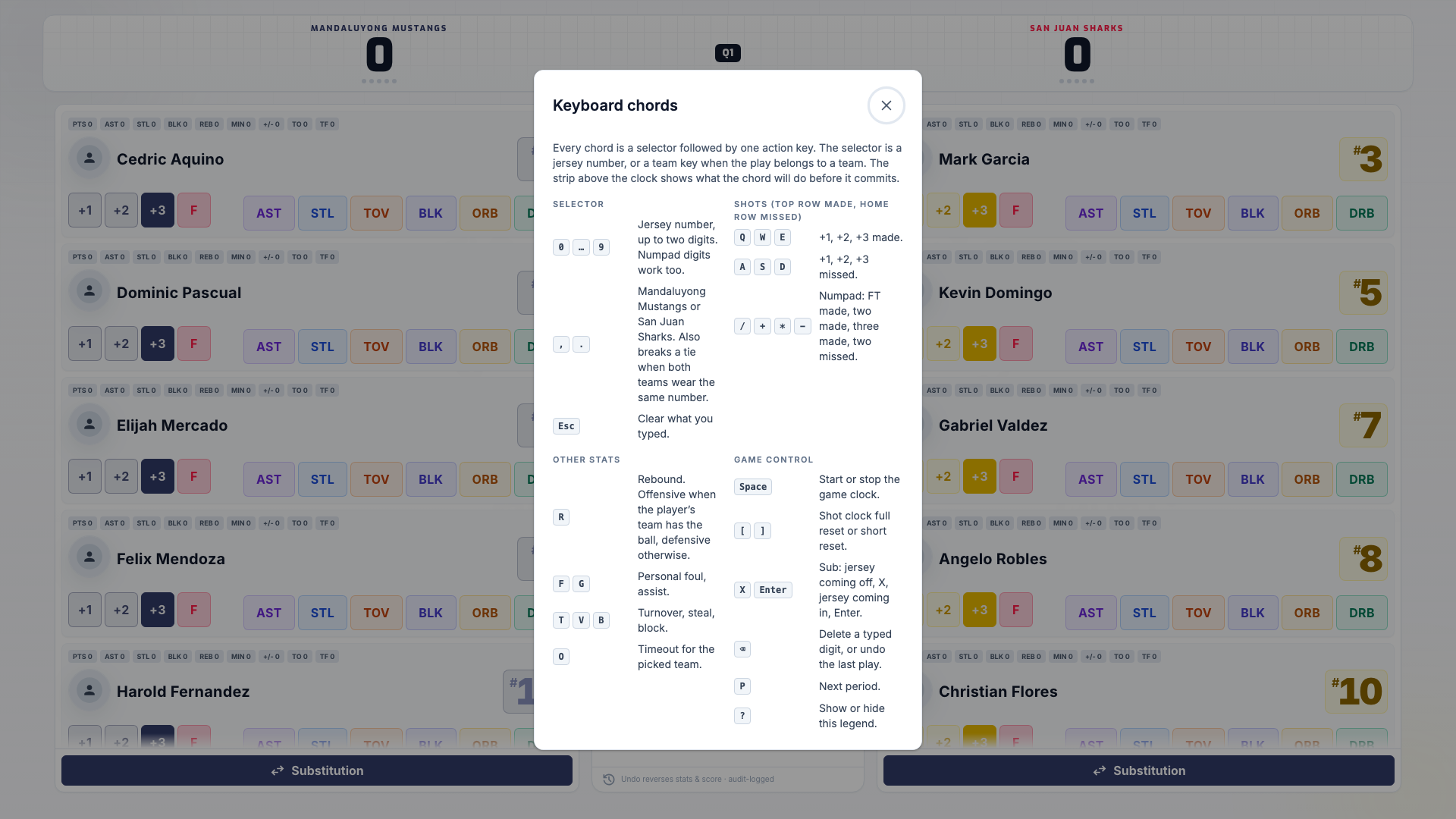
On a device with a keyboard, the Game Day v2 console takes one key per play: tap a player's row, then press the action key. For example, tap number 23, then press W to record a made two. The chip above the pad shows what the next key will do, and the row releases after each play, so every play starts with a fresh tap. Press ? or select the Keyboard shortcuts button to open the full Keyboard chords legend. The classic Game Day console keeps its buttons; there, Space starts and stops the clock. See Watch the Game Day v2 keyboard video.
| Keys | Action |
|---|---|
Q W E | Free throw, two, three made |
A S D | Free throw, two, three missed |
R Y | Defensive rebound, offensive rebound |
F G | Personal foul, assist |
T V B | Turnover, steal, block |
, . | Pick the home or away team for a team basket or a timeout |
O | Timeout for the picked team |
| Space | Start or stop the game clock |
[ ] | Shot clock full or short reset |
X | Substitution: tap the player coming off, X, then tap the bench player coming in |
| Backspace | Undo the last play |
P | Next period |
| Esc | Release the tapped player |
Lost who scored? Press , or . and then a made-shot key. The points count right away and the basket waits in the Waiting for a player tray. When play stops, tap the basket in the tray, then tap the court player who scored. Numpad keys work too, so a USB keypad on a tablet drives the same keys.
What happens next
Scores and stats feed the live box score and play-by-play on the match page. Select Download CSV at any time for a file with the game summary, per-player stats, and the play log. To fix an entry, see Use subs, timeouts, and undo.
Troubleshooting
The shot buttons are greyed out
Only players on the court can record actions. Check the lineup, and check your focus: a Team A Points or Team B Stats focus limits which team you can score.
I picked the wrong player or shot
Undo the play from the play-by-play, then record it again. See Use subs, timeouts, and undo.
Both teams have a player with the same number
On Game Day v2, tap the row you mean; every key goes to the tapped player. For a team basket, press , or . first to pick the team.