RSVP and join a waitlist
An RSVP tells the organization whether you will attend one session, so coaches can plan. You RSVP per session: Going to one and Maybe to the next is fine.
Before you start
- Get approved for the training. See Join a training.
- If the program has no sessions scheduled yet, wait for the organization to add them.
RSVP to a session
Open Sessions
Sign in with the approved account and open the training from Trainings or your profile's Trainings tab. Select the Sessions tab. The page is titled Training Sessions.
Find the session
Check the date shown and select the session heading to expand it.
Choose your response
Select Going, Not Going, or Maybe, and wait for your choice to save.
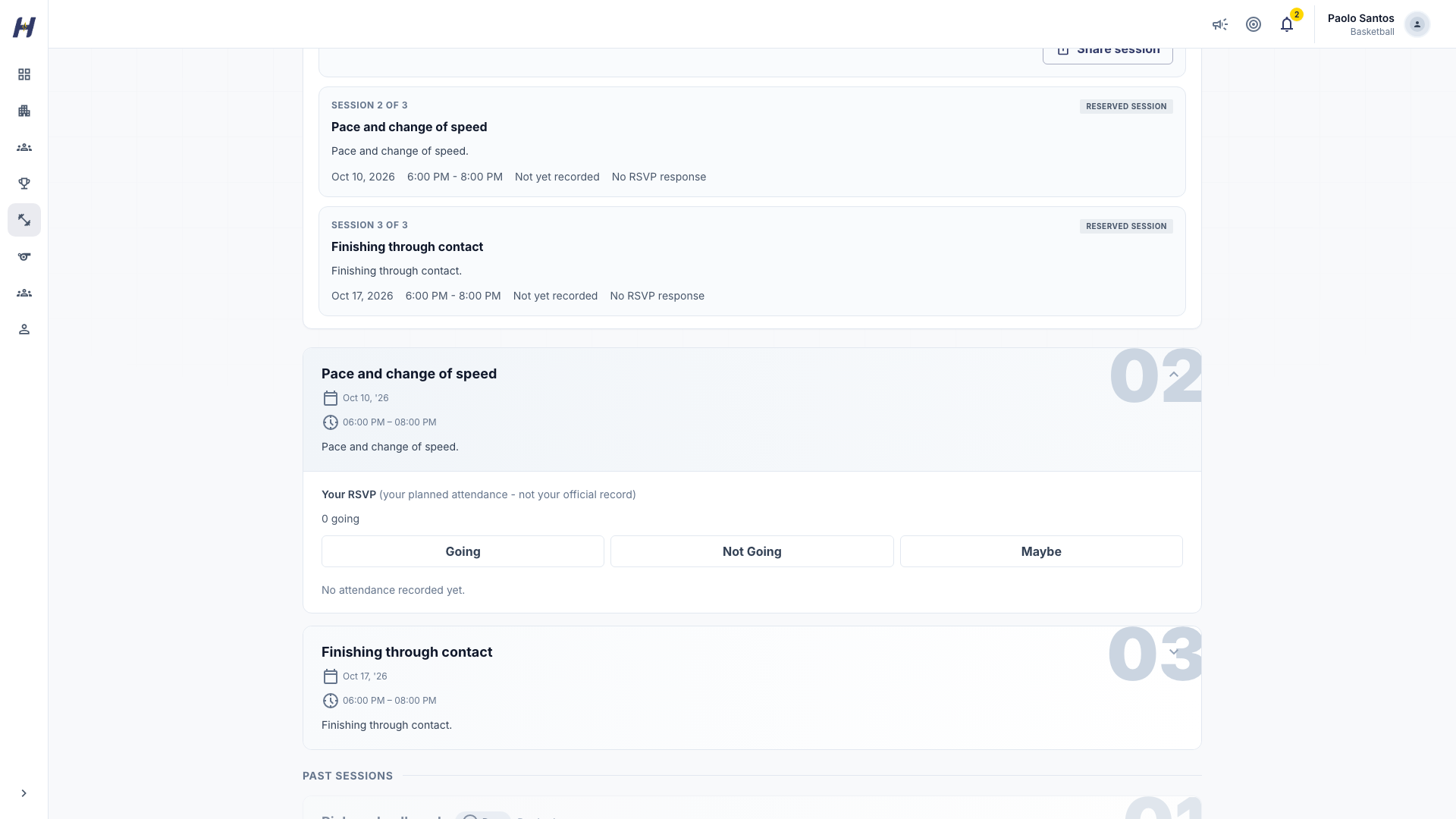
For a weekly recurring session, your RSVP applies to the date you are viewing and resets each week, so you confirm again for the next week. Past RSVPs do not carry over.
What each response means
| Response | What it means |
|---|---|
| Going | You are confirmed, and your spot counts against the session's capacity. |
| Maybe | You might come. It does not hold a spot. |
| Not Going | You will miss this session. You stay registered in the training. |
| Waitlisted | The session was full when you chose Going. HustlX sets this for you. |
If your training gave you a Reserved session schedule, choosing Maybe or Not Going does not cancel that reserved session. Contact the organization to change your package.
How the waitlist works
When a session is full and you choose Going, HustlX puts you on its waitlist and shows that you are waitlisted. There is no separate waitlist button. Some sessions have no waitlist; they show that the session is already full instead.
When someone who is Going changes their response, HustlX promotes the next person in the order they joined the waitlist. Promotion changes you to Going, counts you toward capacity, and sends you a notification. It can happen any time before the session starts, including that day. You do not need to register again.
Change your response
You can change your RSVP any time before the session starts:
- Promoted but cannot come? Select Not Going so the next person can take the spot.
- Said Not Going but now you can come? Select Going. If the session is full, you go on the waitlist.
On session day
- Going: you are on the roster.
- Maybe: confirm or decline before the start so coaches can plan.
- Waitlisted: if you were not promoted before the start, you do not have a spot for this session.
- Not Going: you are off this session's roster but still in the training.
Staff record attendance during or after the session. Your RSVP is a planning signal; attendance is the actual record.
Troubleshooting
I do not see RSVP buttons
Check that your registration is approved and that the session is not cancelled. A cancelled session does not take RSVPs.
Why did I get Waitlisted?
The session was already full when you chose Going. A confirmed Going never changes to Waitlisted on its own.
Can I see who else is coming?
The session shows its confirmed attendees, depending on the organization's settings.
Related guides
Join a training
Find a training, register yourself or your child, pay when there is a fee, and use your access pass, feedback, and certificate.
Create a training
Watch one training program go from the Create training dialog to a published page players register from, with Quick setup for a weekly class and Customized for a fixed camp.