Set up registration and fees
Registration settings decide who can enter your league and what they pay. Basketball and volleyball can also offer paid individual player registration where Pay to Play is enabled. Set them before you publish so teams see the right Register & Join option and price.
Before you start
- Create the league as a draft.
- Know your participation fee and any per-game fee or bond your organization actually collects.
- If teams will pay your organization directly, add your bank or e-wallet accounts under Billing > Payment Methods.
Set up registration
Open the league details
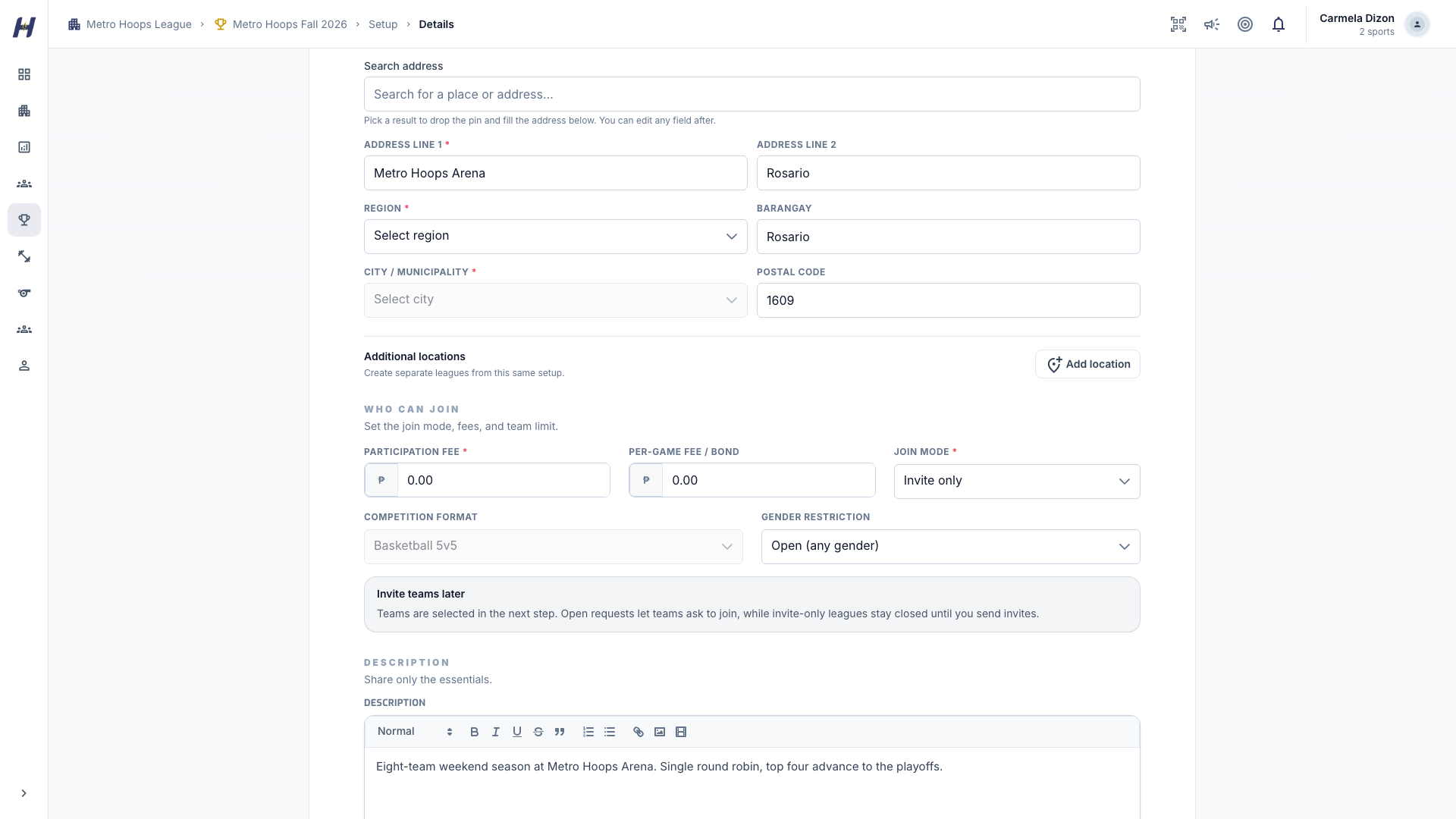
Open the league, select Manage, then Setup > Details.
Choose the join mode
Set Join Mode:
- Invite only: you choose the field. Teams enter through your invitations or the setup team list.
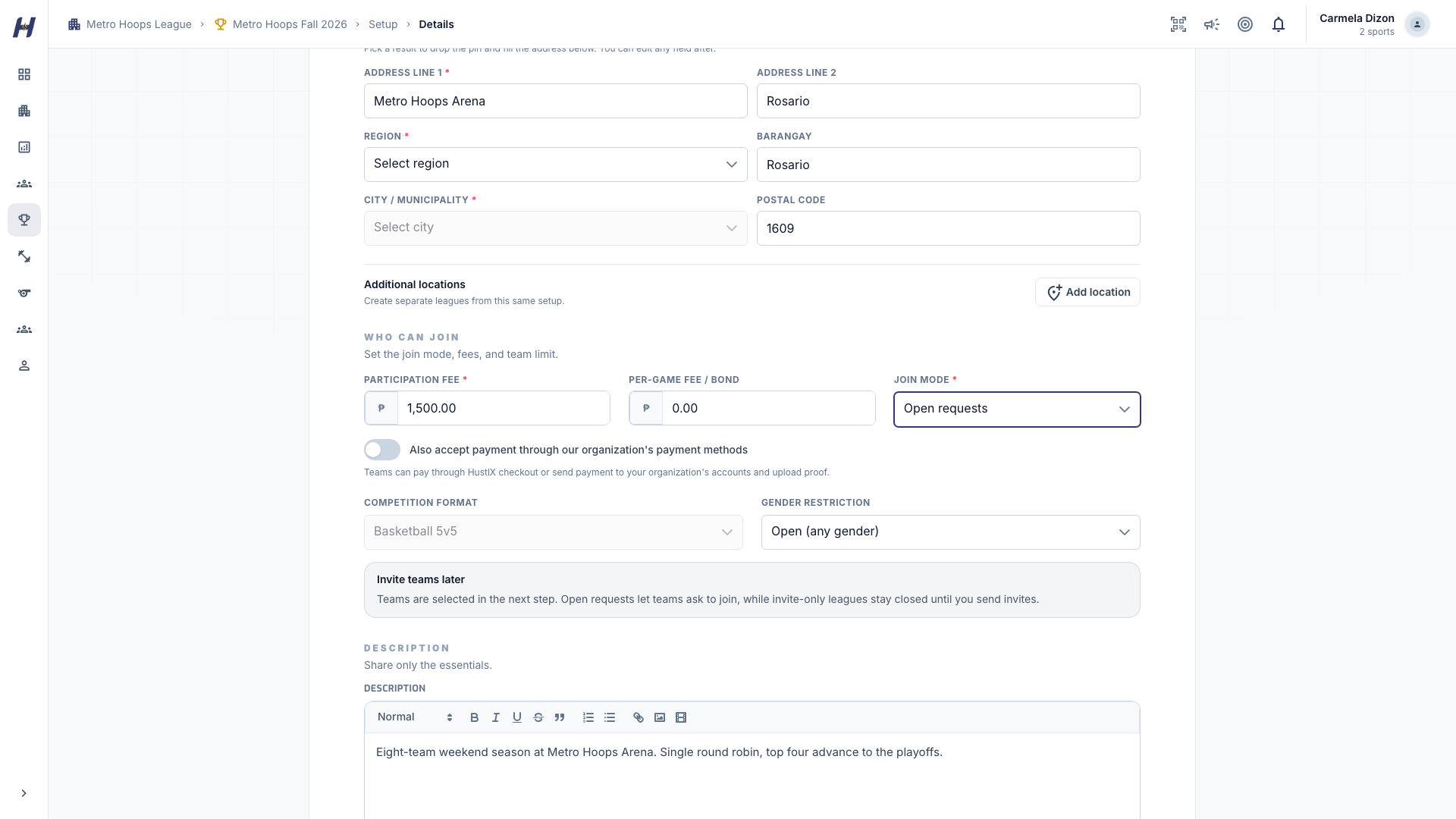
- Open requests: eligible teams can apply from the league page with Register & Join. You review each request.
Leagues for organizations billed outside the Philippines are invite only for now.
Set the fees
- Participation Fee: the registration fee a team pays to enter. Leave it at 0 for free entry.
- Per-Game Fee / Bond: optional. Use it only when your organization really collects a per-game fee or deposit.
- Max Teams: the league's capacity. Enter 0 for no limit.
Choose how teams pay
For an open league with a participation fee, the payment options depend on what is available for your account:
- HustlX online checkout, where it is enabled for your account. The team pays on a secure hosted checkout page, and HustlX confirms the payment automatically.
- Your organization's payment methods. The team pays your accounts directly and uploads Proof of Payment for you to review.
When online checkout is available, turn on Also accept payment through our organization's payment methods to offer both. When online checkout is not available, teams pay your organization's methods and upload proof.
Offer a payment plan (optional)
Open Settings > Payment Plan to turn on Two-part payments. Set the First payment, choose When is the balance due?, and decide whether to Activate registration after the first payment. Two-part payments run through online checkout, so this option works only where online checkout is enabled. A plan needs a participation fee.
Save and publish
Save the section you changed. When the league is ready, publish it from Settings > League Status.
Paid individual player registration
Choose Individual players (paid) under Who registers? while creating your basketball or volleyball league. Save it as a draft. Teams do not need to exist yet.
- Open Manage > Setup > Player registration.
- Create a per-player listing for the same league, organization, and sport. Set its price, registration dates, and capacity. Explain what happens if teams cannot be formed or a player remains unassigned.
- Return to Player registration and link the listing. Open the listing before publishing the league.
- Players select Register & pay on the league page and complete the existing secure checkout. A guardian can register an authorized child. Payment confirms the athlete's place in the pool.
- Create organization teams, enroll them through Teams & Roster, then select confirmed players and an enrolled team in Player registration. Review and confirm the assignment.
Player payments do not automatically create a team or guarantee a team place. Pending payments cannot be assigned. My Pay to Play shows registration and team assignment separately, including Awaiting team assignment until a team is selected.
The per-player listing price includes the existing Pay to Play fee retained from the organizer's proceeds. It does not add the team-registration surcharge described below. Assigning a player collects no additional player payment. Your organization's league team admission remains separate.
After the first registration, the league's registration choice and linked listing cannot change. Removing a registration does not remove its team membership or roster history. Contact the organizer about withdrawal and refunds.
Online registration fee
Paid online team registration adds a 5% HustlX transaction fee to your participation fee. How to Pay shows the registration fee, the transaction fee, and Total to Pay before the team continues to checkout.
For example, a PHP 1,000 registration fee adds PHP 50, so the team pays PHP 1,050. Free registration and payments to your organization's own payment methods do not add this fee. A team that resumes with Continue payment keeps the price recorded on its request. See the payment and refund terms.
Manual payments stay outside HustlX
When a team pays your organization directly, the money goes straight to you. HustlX keeps the uploaded proof so you can review it before approving the request, but it does not collect or hold that money. Manual payments never appear as HustlX collections, fees, or payouts in Finance.
League team admission
League team admission is your organization's purchase for each team that competes in a published league. It is separate from the registration fee a team pays you.
- Team sports (basketball, volleyball, football, futsal): PHP 399 per team per league season.
- Pickleball and racquet sports: PHP 199 per singles entry or doubles pair.
- Each admission checkout adds a 3% checkout fee.
Saving a draft is free. HustlX offers the admission checkout when you publish a league with teams or add teams to a published league. Until a team's admission is active, the team stays inactive in the league, and building or publishing games for the league can be blocked. Pending checkouts keep the price they were created with.
What happens next
- Teams apply or accept invitations. Review them in Invitations and join requests.
- Check manual payment proof before you approve a paid request.
- Confirm the enrolled field, then build the schedule.
Troubleshooting
Teams do not see Register & Join
Check that Join Mode is Open requests and the league is published. If the league is full, raise Max Teams so new requests can be approved. An invitation-only league shows Invitation Required instead.
"This league accepts payment through HustlX checkout only."
Online checkout is available, and the league does not also accept your organization's payment methods. Turn on Also accept payment through our organization's payment methods, and make sure you have an active payment method.
"Two-part payments need a registration fee."
Set a Participation Fee in Details first, then return to Payment Plan.
"The first payment amount must be less than the effective payable price."
Lower the First payment so it is smaller than the full fee.
"League saved as draft. Complete team admission checkout to publish."
Some teams still need admission. Complete the team admission checkout, then publish again.
"You already have an online checkout in progress."
Another checkout for your organization is still open. Finish or cancel it, then retry.