Run a basketball tournament
Use this walkthrough when a bracket decides the champion. It covers two common paths: a tournament that starts as a bracket, and a regular season that feeds a playoff.
Two tournament paths
| Path | Use it when |
|---|---|
| Direct tournament | The event starts as a bracket, with a team count that fits a preset |
| Regular season into playoffs | Teams play a table first, then the top teams advance |
Example seeds for both paths: 1 Northside Wolves, 2 East Bay Titans, 3 Manila Archers, 4 Makati Flyers, 5 Pasig Generals, 6 QC Royals, 7 Taguig Storm, 8 San Juan Knights.
Before you start
- Create the league with Customized, choose Basketball, and keep Standard Table in Format.
- Confirm all teams are enrolled and admitted in Manage > Operations > Teams & Players.
Path 1: Direct 8-team tournament
Create the bracket
Open Manage > Operations > Matchmaking, select Create games, then Knockout bracket. On Teams & seeds, choose 8-Team Standard Playoffs and put the teams in seed order. Select Create bracket. HustlX saves the first round as draft games and opens Preview.
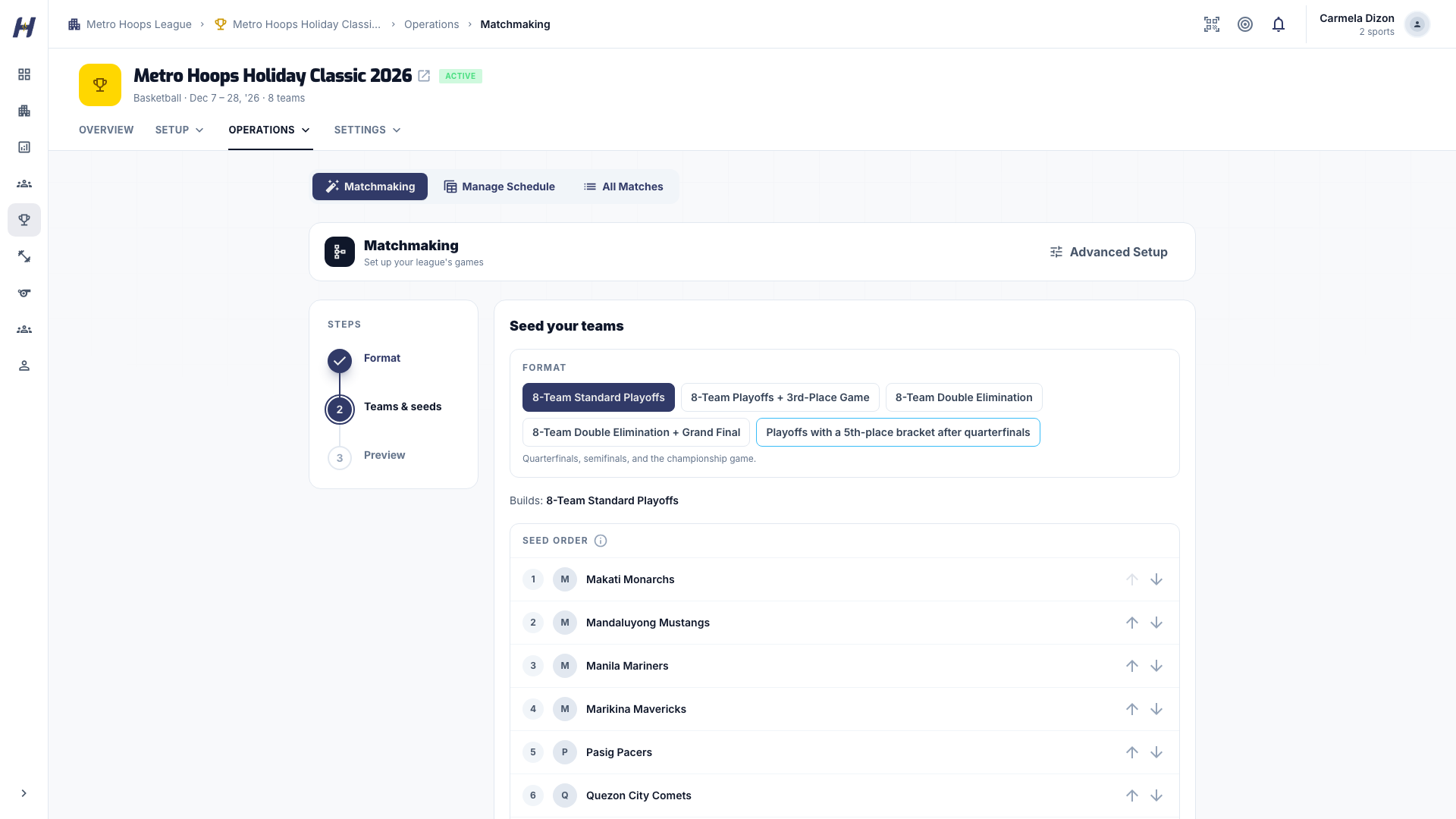
If a preset is marked unavailable for your team count, use group brackets or Advanced Setup instead.
Review and publish the first round
Expect seed 1 vs 8, 2 vs 7, 3 vs 6, and 4 vs 5. Set dates, choose which games to publish, and confirm Publish, or use Keep as drafts to finish later. Before making games public, check venues, officials, arrival windows, and rest between games for teams that may play twice in a day.
Explain the bracket with Structure
On the Matches tab, switch to Structure, or open Full Structure, to show which round is active, who feeds into the next round, and which rounds are waiting on results.
Advance each round
Run every quarterfinal through Game Day and conclude it. Then return to Matchmaking > Advanced Setup, open the competition, preview who moves forward, and create the next round. Review the new drafts in Manage Matches before publishing. Repeat for the semifinals and final.
Path 2: Regular season into quarterfinals
In this example, 12 teams play a regular season, and the top 8 teams in the final overall standings advance to the quarterfinals. You can still adjust the field for a withdrawal, disqualification, or local tiebreaker.
Before the bracket exists, Structure shows a read-only Playoff Preview. It does not create games or confirm who advances, and you do not need it to continue.
Finish the regular season
Conclude every regular-season game, record forfeits correctly, and settle any tiebreaker your league decides outside the app.
Open the advancement screen
In Manage Matches, the callout Ready to advance to Quarterfinals appears once the regular season is complete and no quarterfinals exist. Select Advance top 8.
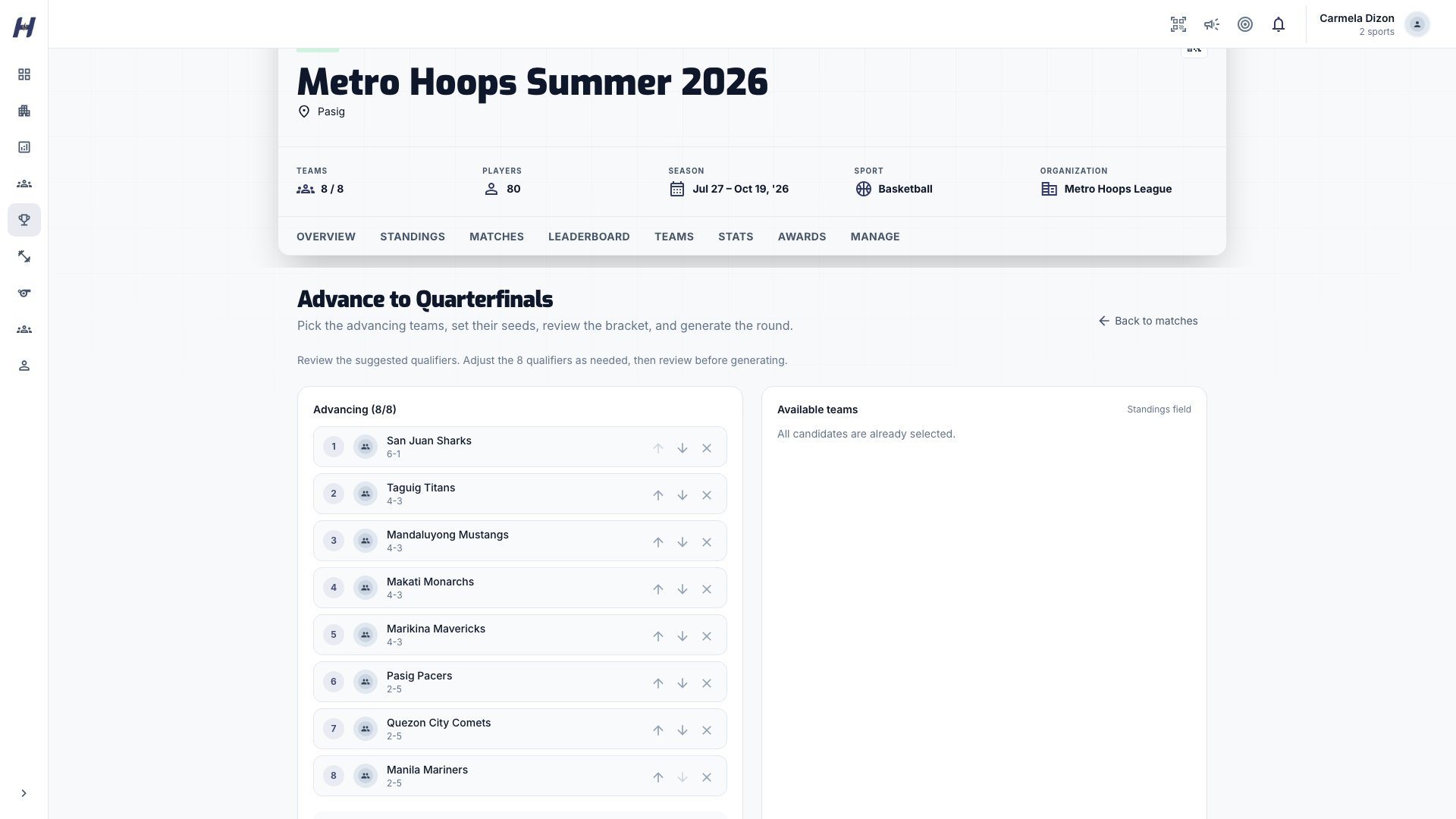
Confirm seeds and pairings
The top 8 are preselected from the final overall standings, with the rest under Available teams. Remove, add, or reorder teams as needed; exactly 8 must be selected. The preview pairs:
- #1 vs #8
- #4 vs #5
- #2 vs #7
- #3 vs #6
For a grouped league with crossover mode None, the league's Playoff Qualification decides the field. With Overall standings, a team outside its group's top two can qualify on its overall record. See Choose a competition format.
Generate the quarterfinals
Select Review & Generate Quarterfinals, check Advancing teams, and select Confirm & Generate Quarterfinals. Publish the drafts once dates, venues, and staff are set.
Repeat for later rounds
After the quarterfinals, the callout offers the semifinals with the 4 winners. The semifinals pair the winners of QF1 and QF2, and of QF3 and QF4, in the order shown on the bracket. After the semifinals, it offers the final. Publish the championship game once its date, venue, and staff are final.
If playoff drafts were generated with the wrong field, do not edit published or completed games. Clear the incorrect draft round through Manage Matches, review the final overall standings, and regenerate the round.
What you should see at each stage
| Stage | What the app shows |
|---|---|
| Before setup | Matchmaking home with the enrolled team count |
| After Create bracket | The bracket path and first-round draft games |
| During the bracket | Structure with active and waiting rounds |
| After a round concludes | The next-round action in Manage Matches |
| Before publishing a round | New drafts to review in Manage Matches |
Related guides
Regular season
Follow one 8-team basketball season from league setup and a round-robin schedule through game day, standings, awards, and the public record.
Group brackets
Split a 16-team or 32-team basketball league into groups, generate group games, and advance teams through crossover, classification, or repechage paths.