Where to find things
Use this map when a guide tells you to open a page or a Manage menu. Menu labels below match the app.
Main navigation
| Area | Where | What you do there | Guide |
|---|---|---|---|
| Dashboard | Icon rail > Dashboard | See matches, stats, and requests that need you | Your dashboard |
| Organizations | Icon rail > Organizations | Open or create an organization; choose one under Your organizations | Create an organization |
| Communities | Icon rail > Communities | Find communities and pickup games | Find a community |
| Leagues | Icon rail > Leagues | Browse leagues, fixtures, and standings | Follow a league |
| Trainings | Icon rail > Trainings | Browse and register for trainings | Join a training |
| Teams | Icon rail > Teams | Find a team or create your own | Find and join a team |
| Notifications | Bell icon in the top bar | Answer invitations and read alerts | Invitations & Notifications |
| Profile and settings | Account menu in the top bar > My Profile or Settings | Edit your profile, sports, family, and security | Account settings |
| Tours | Account menu > Help & Tours | Replay a walkthrough of the page you are on | Tutorials and tours |
The icon rail also shows Tryouts and Players. Courts and bookings run in the separate HustlX Courts app; see Courts & Bookings.
Organization Manage
Open the organization and select Manage. Plain tabs open one page; a tab with a chevron opens a dropdown.
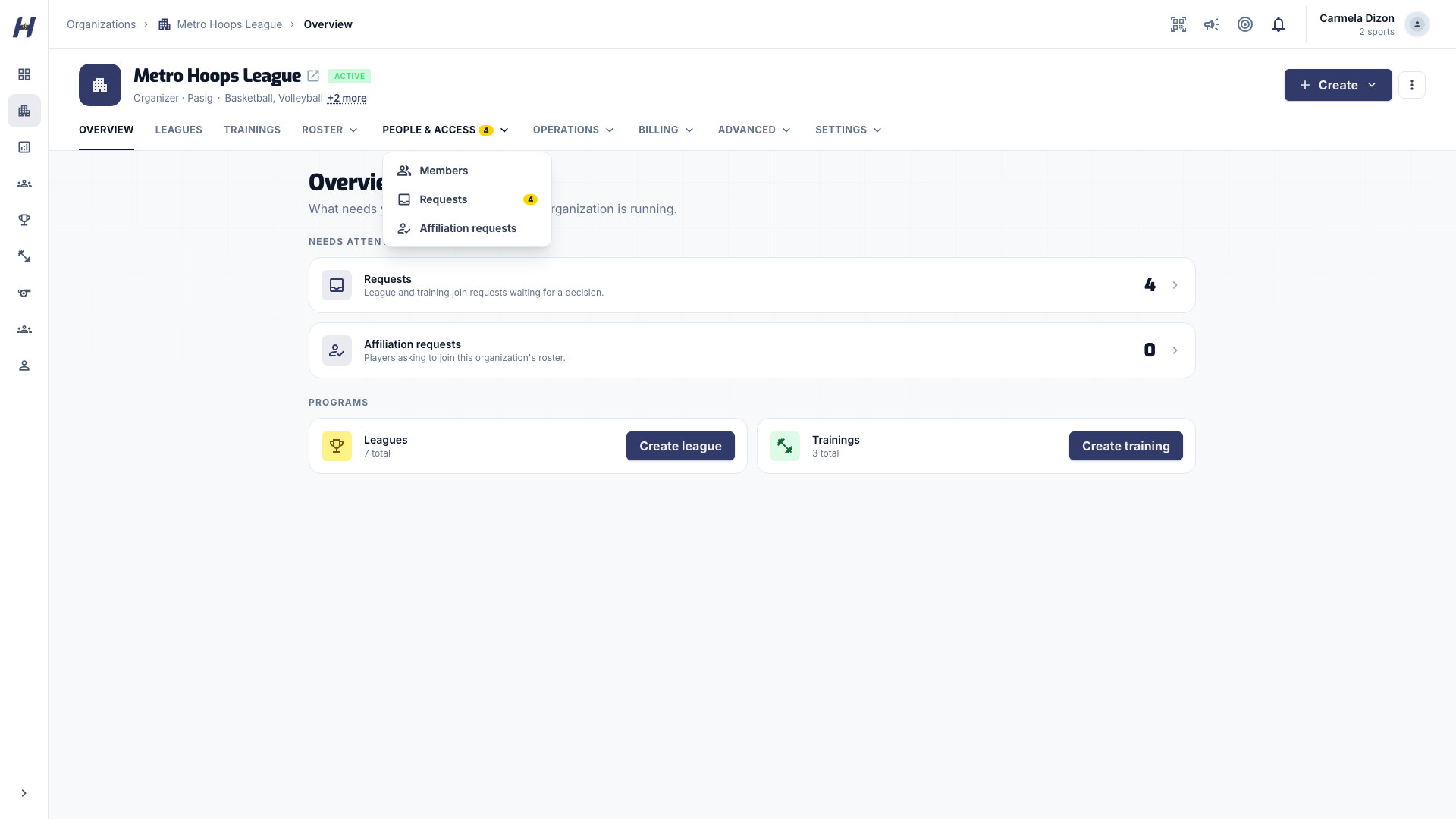
| Tab | Pages | What you do there | Guide |
|---|---|---|---|
| Overview | Overview | Daily summary of the organization | Organization settings and members |
| Leagues | Leagues | Create and open the organization's leagues | Create a league |
| Trainings | Trainings | Create and open the organization's trainings | Create a training |
| Roster | Players, Coaches, Teams | Keep organization player, coach, and team records | Teams and rosters |
| People & Access | Members, Requests, Affiliation requests | Invite staff and set roles; decide league and training join requests | Organization settings and members |
| Operations | Announcements, Officials | Post updates; staff matches with officials when the assignment board is on | Announcements |
| Billing | Collections, Payment Methods, Wallet & Subscription, and other finance pages | Track money in, payment instructions, wallet, and Annual Registration | Wallet and top-ups |
| Advanced | Capabilities, Court Affiliations, Documents, Feedback Forms | Turn programs on, link courts, and keep training paperwork and forms | Documents and waivers |
| Settings | General, Branding | Edit organization details and look | Organization settings and members |
Billing pages depend on your finance access. Full finance access adds Dashboard, Transactions, Expenses, and Reports.
League Manage
Open the league and select Manage.
| Tab | Pages | Guide |
|---|---|---|
| Overview | Overview | Run the season |
| Setup | Details, Rules & Scoring, Teams & Roster (or Entrants for competitor-entry sports) | Create a league |
| Operations | Matchmaking, Teams & Players, Roster Audit, Join Requests, Awards, Announcements | Create and schedule matches |
| Settings | League Status, Payment Plan, Templates, Danger Zone | Set up registration and fees |
Competitor-entry sports show Manage competitors in Operations instead of the team roster pages.
Training Manage
Open the training and select Manage.
| Tab | Pages | Guide |
|---|---|---|
| Overview | Overview | Create a training |
| Setup | Basic Info, Logistics & Pricing, Requirements & Prep, Training Path | Create a training |
| Operations | Sessions, Participants, Studio, Attendance, Feedback, Join Requests, Documents, Announcements | Sessions and attendance |
| Settings | Training Status, Promos, Payment Plan, Required Documents, Danger Zone | Promos |
Community Manage
Open the community and select Manage. Operations holds Join Requests, Members, Pickup Games, Pickup Schedules, Pickup Join Requests, Pickup Payments, Players, and Teams, plus Creator Studio when it is available. Settings holds General and Danger Zone, plus Subscription, Payouts, and Payment Methods when they apply. See Run community pickups.
Personal settings
Open the account menu and select Settings. The tabs are Profile, Sports, Locations, Family, Security, and Payouts. See Account settings.